Monday, April 26, 2021

General Data Protection Regulation

 Online storage is increasing day by day. With an ongoing demand for protecting sensitive data of individuals and enterprises. Security experts are constantly challenged to protect such large amount of general data. The council of European Union has tighten the data protection laws because of large data breaches. Such data breaches are followed by anonymous entities and big data managing companies. Only the general data protection regulation is the answer from the council to these growing demands. These demands aims to enhance the data protection from all individuals in the European Union.

Updates GDPR norms Makes Company that processes individuals that are belonging to the European Union falls under data processors. Since web hosting companies have direct access to sensitive information. They also become liable to follow strict regulations.

Did HTS Hosting supports GDPR compliance?

HTS Hosting supports European Union’s General Data Protection Regulation. HTS Hosting is committed to secure complete processing of sensitive data and also committed to provide transparency over any data. HTS Hosting always updates its privacy policy whenever general data regulations come up. It shows more clarity over data processing because it is designed to give more control over the information.

How this does affect our customers?

Individuals, companies and businesses providing services to EU residents need to comply with GDPR law. To the extent you can collect EU resident’s personal data that includes collection, processing, storage and transmittal of such data. HTS Hosting privacy policy explains what they need to collect and how they handle your sensitive data. The statement includes with many examples that how personal data is utilized by HTS Hosting.

What rights GDPR provide to EU residents?

The rights of EU resident under the GDPR, how you can exercise these concerns: -

  • Right to access – You and your customers can ask HTS Hosting what personal data is processed, why and where.
  • Right to rectification – If you and your customer wants to correct, revise and remove any of the data we retain on you.
  • Right to be forgotten – You and your customer can cancel your HTS Hosting account at any time. We will completely remove your account and all the associated details.
  • Right to restrict processing – If you and your customer believes that your data in being inaccurately unlawfully. You can request limited use of your data.
  • Right to portability – We provide you an ability to move your account data to third party at any time.
  • Right to object -  If you and your consumer has decided to no longer include your data in analytics to provide target base marketing content. You can contact our team for request removal of this data.

HTS Hosting will provide all the necessary mechanism to comply with requests from our customers and constantly support in fulfilling GDPR requests from our customers.

An EU customer of HTS Hosting services and plans?

Usually, HTS Hosting is a controller concerning all the personal data that you provide to HTS Hosting as customer. We will not publish personal data of our customers to domain name registrants located in the EU in the WHOIS. We do this to ensure that WHOIS output is completely compliant with GDPR. Although, excess of personal data of any domain name registrants is granted when such access is necessary for any technical reasons and for any other legal reason.

Conclusion: -

Thus, GDPR should be complies with all hosting companies. Because companies holds all the confidential and sensitive information of their customers. For finest and best security. HTS Hosting continuously updates itself with GDPR compliances to provide Linux shared web hosting, Windows shared web hosting, reseller streaming video and other hosting services.

Source: https://htshosting.org/blog/2021/04/general-data-protection-regulation/

Content Delivery Network (CDN)

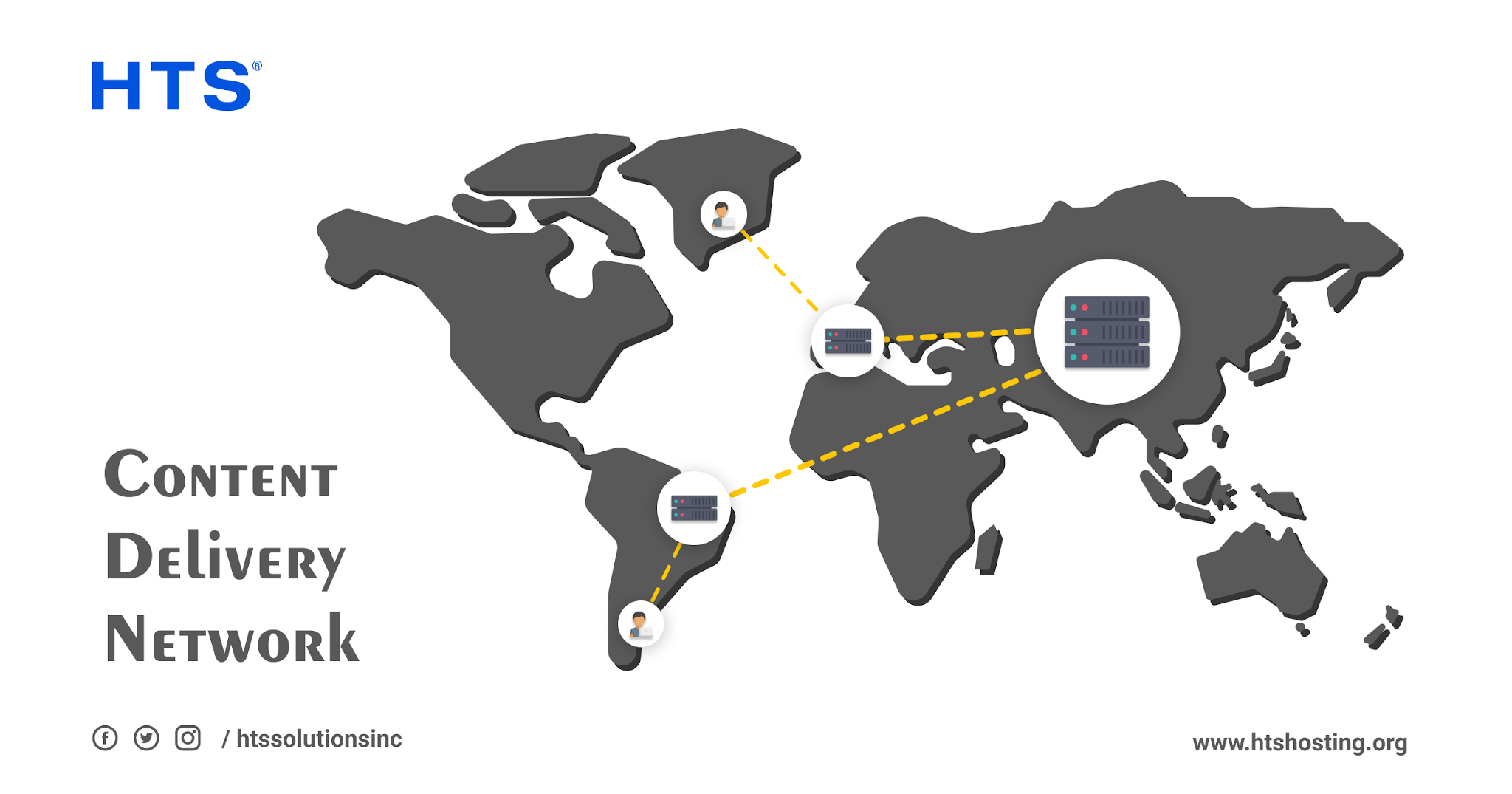
Content delivery network is an extreme-distributed platform for servers that helps to minimize delays in loading of web page content. CDN reduces the physical distance between web server and the end-user. It helps users to view content at exact high quality without any delay. Without CDN, content origin servers will respond to every single request. This will result into significant high web traffic and consecutive request. High consecutive load could result into high web traffic spikes. By closing end-user request in place of the origin and in closer physical and network proximity to the end user. CDN offloads web traffic from content servers and boost the web experience. CDN benefits content provider and its user.

CDN (Content Delivery Network) Working: -

Over half of the internet’ web traffic deliver by content delivery network. The goal of the CDN is to reduce latency time. They delay between submitting a request of web page and web page that completely loads on end-user device. By reducing the physical distance that request has to travel. For instance – an Indian website visitor wants to view content of US server. Without CDN, user will experience poor loading time if this request has to travel across different oceans. But with CDN, it will store cache version of website content in different geographical locations around the world. This is known as points of presence (POPs). These POPs will contain their own caching servers and will be completely responsible for delivering website content in requested location.

User-agents that runs on web browsers make requests for the content required to render web pages such as HTML, CSS, images and JavaScript files. Most CDNs will request for the content that will cause end user to be mapped to located CDN server and server will respond to cached version of the requested files. If it fails to locate requested file, it will look for the requested content on the other servers. IF the requested content is unavailable, CDN will act as request proxy to origin server and store the fetched content to serve future requests.

CDN can deliver variety of content in fact it can deliver incredible content that includes HD quality and 4K content like – video, audio and software’s. Data records that contain financial and medical information and much more. Potentially any data can be delivered through CDN.

Why to use CDN?

CDN offers easy way to increase the speed of website and lowers down the latency. They are very essential for the fast, efficient and secure delivery of content to users around different parts of the world. This content is not limited to caching on the website content. CDN can also comprise 4k and HD quality content. Website visitor spans growing shorter by the day. It is imperative to deliver the content as fast as possible. As more business organization go online. More world comes together on the internet to connect, share and shop. Because of high demand now content providers are facing an increasing array of challenges such as – different types of content. Adjusting content for different devices. The inherent capabilities of CDN means that providers are uniquely positioned to help businesses overcome. For over 20 years, CDN have formed a backbone of the internet. Delivering content for retail, finance, healthcare and many other businesses.

Conclusion: -

Thus, increase in different websites also demanded CDNs to fully functioned. Because CDN can carry high quality data. It has become necessity for the internet. CDN can respond quickly If you’ve finest web hosting servers. For best hosting services connect with HTS Hosting, that provides WordPress hosting in India, Linux dedicated server hosting, Self Managed VPS Hosting and other hosting plans.

Source: https://www.htshosting.org/knowledge-base/technology/105/content-delivery-network-cdn

Differences between Web Servers and Application Servers

Before delving into the differences between a web server and an application server, it is important to understand what these are. Both are essentially different types of servers. A server is either a computer program/software or computer hardware, which delivers functionality for clients, which are other programs or devices. It works on a client-server model. Client-server models work through the request-response model, wherein a request is sent by a client to the server. The server carries out certain actions and then sends a response to the same client. This response contains the needed result or acknowledgment.

A server functions as a central repository for the storage of data and programs that can be accessed by a network’s clients. It aids in managing the resources of a network and delivers shared services for connecting workstations. Additionally, it enables sharing of data as well as software and hardware resources among clients.

Various functionalities are provided by servers, which are known as services. These services include carrying out computation for clients as well as data and resource sharing among different clients. Servers can be of many types, such as file servers, print servers, game servers, mail servers, database servers, web servers, application servers etc. The aim of this blog is to provide information about the differences between web servers and application servers.

Web Servers

A web server is meant to host web pages. It is a key component that contributes significantly to the existence of the World Wide Web because every website is hosted on a certain web server.  A web server not only stores the files of websites but also delivers those over the Internet to render websites accessible. Every website is hosted on one or more than one server and each web server can host one or multiple websites.

Web servers accept requests from clients for static content, such as HTML (Hypertext Markup Language) pages, videos and images that are related to websites and subsequently fulfil these requests. A web server only takes care of HTTP requests and responses. It can either be a computer program or a computer. It can also exist as a virtual machine program.

Web servers are provided by web hosting companies through the service of web hosting. In web hosting, server space along with the necessary services and technologies are made available for keeping websites up and running seamlessly. The most efficient web hosting companies are usually referred to as the “Best Linux Hosting Company”, the “Best Windows Hosting Company”, the “Top Cloud Hosting Company” etc.

Features of Web Servers

The main features of a web server have to do with handling HTTP protocol and supporting web-based applications. It does not support Database Connecting Pooling, does not provide EJB support and doesn’t have Server-side programming.

Application Servers

An application server refers to a mixed framework of software that hosts applications. It enables the creation of web applications and the server environment on which these can be run. Application server clients involve web servers, GUIs (Graphical User Interface) as well as other application servers.

An application server acts as a go-between for a database server and the users by enabling different protocols and APIs (Application Programming Interfaces). This type of server hosts as well as installs and operates applications along with associated services that are meant for end users. The hosting and delivery of high-end applications are facilitated by such a server. Application servers expose business logic for generating dynamic content. These have their own graphical user interfaces and can manage their own resources, transaction processes, connection pooling etc.

Application servers have load balancing, clustering, high availability monitoring, integrated redundancy along with support with regard to complicated database access, for high-end requirements. This type of server is ideal for use when there is a requirement for integrating with databases and servers. An application server provides the necessary integrity to data and code through a centralized approach for ensuring that applications are updated and upgraded.

Features of Application Servers

The main features of application servers are that these aid in managing backend logic and in deploying applications, database pooling, dependency injection etc. An application server serves dynamic business logic.

Key Differences between Web Servers and Application Servers

A web server provides runtime environment to web applications and has only web container. An application server provides runtime environment to enterprise applications and has web container along with EJB container. Web servers function well for static content, whereas application servers are relevant for dynamic content. Web servers consume less amount of resources (memory, CPU etc.) in comparison with application servers, which consume more resources. A web server supports HTTP Protocol but doesn’t support multithreading. An application server supports HTTP along with RPC/RMI protocols. It also supports multithreading. Last but not the least, web servers facilitate such web traffic which is not very resource-intensive. Application servers facilitate resource-intensive, longer running processes.

Source:https://www.htshosting.org/knowledge-base/server/104/differences-between-web-servers-and-application-servers


Friday, April 23, 2021

How to Improve Customer Support in Hosting?

 In web hosting, good customer support can make lot of difference. Website hosting is not easy. There are lot of problems that will come up. If any web hosting is not providing quality customer support. Then their customer experience a lot of issues in using their services and products. Customer support of web hosting company does not seem quite. But when customers run into errors, queries and complications on daily basis. This become a pretty big deal. A good web hosting company always make sure that every person of their support team is fully trained and prepared to guide their customers through all their queries.

Install New Tools: -

Most web hosting companies offer different tools and software’s to streamline their customer’s functionalities. Most popular software integrations such as – CMS (content management systems) like – Joomla, WordPress and Magento. Sone other platforms such as – eCommerce, blogging and many other specialized areas of the web. While configuring and installing you may get stuck. You can contact customer support of your hosting company to find your way back.

Website Errors and Malfunctions: -

Every website falls to unexpected errors and malfunctions. Not all website has their technical experts in their team. Besides, server infrastructure depends on host to host. Even if you’ve prior experience in web hosting and server management. Other host might not provide common feature. This is the main area where customer support come into your website and get you out of all the mess. Hosting companies trains them to resolve in such situations. Taking complete control over the problem can make you out faster.

Evaluating Customer Support: -

It is hard to evaluate customer support until you face some real problem and contact customer support. Although, you can follow some below points to measure the grade of customer support: -

  • Response Time – Response time refers to how long support team is taking to respond for your help. Having standard response time is completely non-negotiable while choosing web host. Customer will only wait if their website is not working and there is no way to get out. So the customer support must be standby and ready to pick call.
  • Methods of contacting – Most web hosting companies provide customer support through email. But in HTS Hosting we provide customer support through all mode of communication. Phone support – The fastest way to contact support team. There is no need to wait for message or any email. Another way is chat support – With live chat you will get customer support. If customer can handle multiple task at one than live is the best option. Ticketing System – Almost all web hosting services offers ticketing system. By opening ticket, you request to hosting company to solve your issues.
  • Knowledge Base – Many questions can be answered by searching the web hosting knowledge base and blog. The best web hosting service updates their knowledge base continuously. Adding solutions of customer’s problem helps customer to encounter their issues. A strong knowledge base which makes complex technical concepts into simple language related to hosting can help customers to solve their issues.

Conclusion: -

Resolving customer queries shows a positive sign for any web hosting companies. Because many customers face issue while setting their website in the web hosting control panels. For quick customer support and most affordable hosting plans connect with HTS Hosting, best windows hosting company providing streaming reseller and other web hosting plans.

Source:https://www.htshosting.org/knowledge-base/web-hosting/103/how-to-improve-customer-support-in-hosting

Server NAS software

 NAS is the abbreviation for Network-attached storage and has gained popularity among enterprises and small businesses as a scalable, effective, low-cost, on-premises data storage solution. NAS servers serve as a central point for storing as well as retrieving data of organizations. Network-attached storage servers are special computers that have been built for holding one or multiple storage drives. NAS systems are essentially networked appliances. These have one or more storage drives, which are usually organized into logical, redundant storage containers, known as RAID (Random Array of Independent Disks). A RAID consists of multiple drives that have been integrated for the purpose of ensuring an improvement in the performance of a single drive. The various ways of configuring a RAID provide enhanced speed in some cases and better data protection in others. Some RAIDs are capable of delivering both simultaneously.

To digress, servers can be of many types. Servers are used by web hosting companies for the purpose of storing the files of websites. When these files are delivered over the Internet then websites become accessible. The most efficient web hosting companies are usually referred to as the “Best Website Hosting Company”, the “Best Windows Hosting Company”, the “Best Cloud Hosting Company” etc.

With regard to NAS servers, the use of NAS technology delivers increased service of files as well as swifter access to data. Unlike block-level storage, Network-attached storage is a file-level data storage server which is connected to a network that provides a heterogeneous clients’ group access to data.  NAS is specialized for the purpose of serving files through either its hardware or configuration or software. NAS storage does away with the responsibility regarding file serving from a network’s other servers. It usually ensures access to files through protocols for network file sharing. A dedicated NAS offers the benefits of simple configuration, faster access to data, convenient administration. With every update, NAS is becoming more user-friendly and this helps users in managing their NAS. The latest development in NAS technology has to do with its increased scalability. This is required when NAS devices have either reached their capacity for real storage or their performance limits. 

Network-attached storage provides the framework for file-level storage and is capable of holding local storage for archival data, retention and compliance; assisting applications, databases as well as servers (physical or virtual) for data storage; sharing storage location that is accessible through LAN and allocating hot and cold tier data between cloud file storage and on-premises.

NAS Devices’ Classification

Based on the way NAS devices are made, these can be classified into the following three types:

Embedded system based NAS- An ARM or MIPS based architecture for processors along with an RTOS or an embedded OS are used in it for running a NAS server. Its functions suit most of the requirements of end-users. Its power consumption is fair.

Computer-based NAS- The functions of this NAS type are the most powerful but it consumes the most power among the three types of NAS.

ASIC based NAS-  It uses a single ASIC chip, file system and hardware for implementing TCP/IP. This chip doesn’t contain any OS. That’s because all the operations that have to do with performance are attained through hardware acceleration circuits. It provides limited functions and its power consumption is low.

Functioning of NAS Software

NAS devices are present in between network storage and network switches. Data is shared and retrieved from the NAS by the clients through data transfer protocols. Users are able to interact seamlessly with the resources of the NAS.

Despite NAS systems being lightweight and being capable of delivering minimal tasks with regard to files, the operating systems of NAS provide some essential applications, such as productivity tools, business and collaboration related applications etc.

The Main Features of NAS Software

NAS software includes certain features that protect data. These include backup, snapshot, replication and encryption.

Backups maintain a full copy of an organization’s or user’s data. Hence, it is important to keep regular backups. Snapshots, which are also known as versioning, provide a digital picture of one’s data. The difference between snapshots and full backups is that in snapshots the only data that is saved has to do with the changes that have taken place in the last snapshot. This minimizes space consumption. Replication refers to a solution wherein an updated backup is kept ready and can go live in the event that the source cluster goes offline. NAS systems provide encryption features with regard to full-disk software encryption as well as SED (Self-encrypting drives).

NAS Software Uses

NAS software is mostly used for the following purposes-

  • For sharing as well as for collaboration among clients
  • To configure a network’s specialized Internet settings
  • For accessing files while switching devices
  • For configuring protection with regard to data backup, encryption, replication etc.
  • For increasing the storage for new files

The Benefits and Drawbacks of NAS

The main benefits offered by NAS have to do with it being a fast and secure option for sharing files as well as it providing convenient in-network storage. Additionally, it is lightweight, doesn’t incur additional costs post setup and doesn’t require third party data managers. Remote access to NAS’ cloud is possible.

Its major drawbacks are that it requires power for operation, as well as technical skills for its set up and maintenance. There is data redundancy.

NAS vs. General Server Software

NAS OS are usually lightweight and are embedded in the hardware. Unlike other servers which are capable of managing many requests, NAS software can only send and receive requests for storing data and sharing files. NAS servers differ from most servers that have powerful hardware and can multitask. Moreover, general servers cost more than NAS as NAS units need to be bought and set up and post that these incur no additional costs from the NAS vendor.  NAS devices are smaller in size than the usual server modules.

Conclusion:

Scalability along with data protection and near-instantaneous access to business-critical volumes of storage are ensured by Network-attached storage (NAS) software. NAS solutions aid in adequately storing and sharing data of businesses that opt for migrating to a cloud infrastructure or a hybrid infrastructure.

Source: http://htshosting.org/blog/2021/04/server-nas-software/

Tuesday, April 20, 2021

Remote Desktop Protocol (RDP)

 Remote Desktop Protocol allows remote users to control Windows OS on another device. Peripherals like keyboard and mouse are shared with remote machine. Allows to use and control as you are sitting in front of it.

RDP Tool for Windows: -

For RDP connections to work, you require two components – RDP server and RDP client. RDP server is Windows PC and client you’re connecting to that you will control. The client is a computer, mobile device and other end-point devices with RDP client application installed from which you can control the server. Microsoft offers own client for Windows, macOS, Android and iOS with other third party options available for Linux and other platforms. RDP is a Windows protocol and can establish remote connections using RDP with Windows-PCs and Windows Server installations that support it. Not all version supports RDP. Windows 10 Home only supports RDP as client to connect other Windows desktops. You can only establish single connection to Windows PCs that have remote desktop enabled. To connect multiple users at one. You’ll require Windows server with remote desktop services component installed and enabled.

If you want to establish RDP connections to secure enterprise network from remote location. You’ll need remote desktop gateway service installed and you will need to configure Windows server installation. RDP offers fully secured session and replaces the need of VPN (virtual private network).

Tips to establish secure RDP connection: -

  • Don’t allow open RDP connections – If you want to use Windows remote desktop over the internet. You should set up your own virtual private network and use RD gateway to create secure tunnel to your local network.
  • Enable network level authentication – This authentication is already enabled if you’re using Windows 10, Windows server 2012 and newer. And if you’re using older version of Windows. You’ve to enable this authentication.
  • Restrict RDP connections to non-administrators – Allow only non-administrator accounts to remotely connect to Windows PCs. Standard user accounts cannot change settings, install any software and they have limited access to files. This should limit the damage from any potential rogue connection that could make.
  • Limit the password attempts – Limit the number of incorrect passwords on accounts before it is locked out. Password attempts should be limited from a denial of service attacks.
  • Use complex, secure passwords – Using strong passwords is good advice. Especially, for Windows remote desktop connections. Never use same passwords for multiple accounts. Always use combination of letters, numbers and symbols.
  • Setting RDP for maximum encryption – By default, RDP always use highest possible level of encryption. To ensure highest level of encryption is always used. Check default encryption in Group Policy Editor in – Computer Configuration -> Administrative Templates -> Windows Components -> Remote Desktop Services -> Remote Desktop Session Host -> Security -> Set client connection encryption level -> Enabled -> High Level.

Conclusion: -

There are many other software’s that are used in remote desktop connections. Teamviewer, Anydesk, VNC and there are many different remote software’s that are used. You can use RDP in various ways. Mostly RDP is used in VPS hosting. For best VPS hosting connect with HTS Hosting, best Windows hosting company providing WordPress hosting plans in India, Windows dedicated hosting and many other hosting plans.

Source:https://www.htshosting.org/knowledge-base/technology/102/remote-desktop-protocol-rdp

Shared Hosting Vs VPS Hosting

 Shared hosting is a type of web hosting where you share space on server with other websites. It’s like renting a small portion in shared office. You’ll get your own area but with larger communal space. Shared hosting is the cheapest hosting. It has lot of benefits but sometime things get cramped.

VPS hosting is a virtual hosting environment where you get dedicated hosting resources such as – CPU, RAM. VPS server consists of different slices of a server. You can say it like renting an apartment in a building block where you get more rooms, more space and more flexibility and more privacy. You’ve have full control but you’re still operating with shared server.

Shared Hosting is mostly used in static websites. Websites that have fixed content and are not required to change. Shared hosting is preferable for fro blogging, personal websites and for startups. Shared hosting do not feature security, ultra-fast loading speeds and you won’t require any of these. VPS hosting is step up and ideal for small businesses, online stores and larger personal websites. You’ll see increase in different features such as – security, performance and many other features at very reasonable cost.

  • Shared Hosting and VPS Hosting Pros and Cons: -

Shared Hosting Pros: -

  • Cheapest type of web hosting.
  • Specially designed for beginners and tech enthusiast.
  • Performs very descent on static and low-traffic websites.

Shared Hosting Cons: -

  • You won’t get any dedicated resources.
  • Shared hosting comes with higher security risks.
  • Using shared server might affect your website speed.

VPS Hosting Pros: -

  • You will get what you pay for.
  • Customize VPS according to your requirements.
  • Flexible VPS plans to grow with your website.

VPS Hosting Cons: -

  • Slightly more expensive than shared web hosting.
  • Requires technical knowledge.
  • You need to have an idea and understand your needs that how much storage and bandwidth you want.

Resources Allocation: -

After some time, everyone needs certain amount of resources. For an instance – Your mobile plan comes with limited calls, text and data. Web Hosting is same. It also comes with limited storage space, RAM and CPU processes. In shared hosting, you share resources with other websites on same server. If one website uses large amount of bandwidth than other websites will suffer. But in VPS hosting, you hold large portion of server’s hardware. You have more resources. You also get root access over the server environment which basically means you can install other software and edit files on the server.

Security: -

Shared hosting is very safe. Providers do lot of work around their security. But there are no guarantees. If other websites go higher on CPU usage than your website might take time to load. If one website makes mistake and has security breach than other websites also comes under the hood of data breaching. But VPS offers much more security. Because you’ve complete dedicated hosting resources. You have complete root access to install and implement different security in your VPS.

Conclusion: -

Shared hosting and VPS hosting offers many pros and cons. For finest features in shared and VPS hosting connect with HTS Hosting, best cloud hosting company providing Windows shared web hosting, Linux dedicated server and other web hosting plans.

Source: https://www.htshosting.org/knowledge-base/vps/101/shared-hosting-vs-vps-hosting

Speed Up Your Website with HTS Solutions - How Fast Hosting Drives Customer Success

  In today’s digital age, speed is no longer just a luxury - it’s a necessity. Customers expect fast-loading websites, and anything less tha...